

Model your first system
In this tutorial you model a small slice of Big Bank, the fictional bank in the Big Bank example: the internet banking that its Digital Banking Team runs. You start from an empty repo, declare a customer, three Services and how they connect, say where they run, and finish with the viewer published on GitHub Pages.
It takes about twenty minutes. Every file you write is shown in full, and the finished Workspace is in examples/tutorial if you want to compare.
Before you start
Section titled “Before you start”You need Node.js 22.18 or later, git, and a GitHub account for the last step. Install the CLI:
npm install --global archidocs1. Create a Workspace
Section titled “1. Create a Workspace”A Workspace is one git repo that holds the whole architecture. Create one and set it up:
git init big-bankcd big-bankarchidocs initarchidocs init writes archidocs/workspace.yaml, adds the .archidocs/ cache folder to .gitignore, and installs the authoring skill for coding agents, with a pointer to it in AGENTS.md. Everything Archidocs reads lives under archidocs/.
2. Define the Team and Environments
Section titled “2. Define the Team and Environments”workspace.yaml defines the Teams that own things and the Environments that Services run in, once for every Project. Replace the starter file with:
# The Workspace from the tutorial "Model your first system": a slice of Big Bank.teams: digital-banking: name: Digital Banking description: Web, mobile and the internet banking API.environments: staging: name: Staging prod: name: ProductionThe keys under teams and environments are ids: lowercase slugs that the rest of the Model refers to.
3. Add a Project
Section titled “3. Add a Project”A Project is one Team’s slice of the Workspace, in a folder of its own. A project.yaml marks the folder and names the Team that owns everything in it. Create archidocs/digital/project.yaml:
id: digitalname: Digital Bankingowner: digital-banking4. Declare the Elements
Section titled “4. Declare the Elements”Every other .yaml file in a Project folder declares its Elements and their Relationships. Create archidocs/digital/model.yaml, starting with the customer:
people: customer: name: Personal Banking Customer description: A customer of the bank, with personal bank accounts. relationships: - to: spa description: Views account balances and makes payments usingA Person is someone who uses a System. Its Relationship sits under it and points to what it uses, with a description that reads as a sentence: “Personal Banking Customer views account balances and makes payments using Single-Page Application”.
Then add the System and its Services below it, in the same file:
systems: internet-banking: name: Internet Banking System description: Lets customers view their accounts and make payments. services: spa: name: Single-Page Application description: Internet banking in the customer's browser. technology: TypeScript, Angular relationships: - to: api description: Reads balances and makes payments through technology: JSON/HTTPS api: name: API Application description: Internet banking over a JSON/HTTPS API. technology: Java, Spring Boot relationships: - to: database description: Stores sessions and preferences in technology: JDBC database: name: Database description: Sessions and customer preferences. type: datastore technology: Oracle Database- The System groups the Services that deliver internet banking. Systems don’t nest.
- Each Service is something you deploy.
type: datastoredraws the database as one. - Each Relationship is declared once, under its consumer, pointing at the provider it depends on. The SPA depends on the API, and the API on the database.
Nobody owns anything here explicitly: every Element is owned by the Project’s Team, digital-banking. See Teams and ownership.
5. Check the Workspace
Section titled “5. Check the Workspace”archidocs check0 errors, 0 warningscheck validates every file against the check rules. Try breaking something: change the SPA’s to: api to to: apii and run it again.
archidocs/digital/model.yaml:19:17  error  unknown-element  Unknown Element "apii" in Project "digital"; did you mean "api"?
1 error, 0 warnings
Rule docs:  unknown-element  https://archidocs.dev/docs/reference/rules/unknown-element/
Each issue names the file, line, rule and what is wrong, and the footer links the page that explains each rule. Put to: api back before you go on.
6. Say where it runs
Section titled “6. Say where it runs”A Deployment is one Service running in one Environment on one Deployment Target, and it is where a URL lives. Create archidocs/digital/deployments.yaml:
targets: aws-eu-west-2: name: AWS eu-west-2 (London) kind: region targets: eks-prod: name: EKS prod kind: cluster eks-staging: name: EKS staging kind: clusterdeployments: - service: api environment: prod target: eks-prod url: https://api.bigbank.example - service: api environment: staging target: eks-staging url: https://api.staging.bigbank.example - service: database environment: prod target: eks-prodThe Targets nest: two EKS clusters in one AWS region. The API runs in both Environments, each with its own URL. Check again:
archidocs check7. Open the viewer
Section titled “7. Open the viewer”archidocs devOpen http://localhost:4321. The viewer starts on the C2 Landscape with Internet Banking System closed; open it to see its Services. Then try what it was built for:
- Select API Application: the panel shows its Owner, its Relationships and its URL in each Environment.
- Turn on the Impact Lens for Database: everything that depends on it lights up, the customer included.
- Switch to the Production Deployment View to see the Services on their Targets.
The viewer reloads as you edit. Stop it with Ctrl+C. The viewer explains each part.
8. Commit
Section titled “8. Commit”The Model is plain files, so it goes through review like code:
git add .git commit -m "Model internet banking"9. Build the site
Section titled “9. Build the site”archidocs build writes the viewer as a static site, with the Model at every past Revision so the viewer can show history:
archidocs build --out _siteecho "_site/" >> .gitignoreOpen _site/index.html through any static file server to see what will be published. You don’t commit _site: CI builds it.
10. Publish on GitHub Pages
Section titled “10. Publish on GitHub Pages”The Archidocs GitHub Action checks the Workspace, builds the site and deploys it to GitHub Pages. Add it as .github/workflows/architecture.yml:
name: Architectureon:  push:    branches: [main]    tags: ["*"]
permissions:  contents: read  pages: write  id-token: write
concurrency:  group: pages  cancel-in-progress: false
jobs:  publish:    runs-on: ubuntu-latest    environment:      name: github-pages      url: ${{ steps.archidocs.outputs.page-url }}    steps:      - uses: actions/checkout@v4        with:          fetch-depth: 0      - uses: chalharb/archidocs@v1        id: archidocs
Create an empty repository called big-bank on GitHub, set its Settings › Pages › Source to GitHub Actions, and push (use your own GitHub user name in the URL):
git add .gitignore .githubgit commit -m "Publish the architecture"git branch -M maingit remote add origin "https://github.com/YOUR-NAME/big-bank.git"git push -u origin mainWhen the workflow finishes, its summary links the site. From now on every push to main republishes it, and a push whose check fails publishes nothing, so the last good site stays up. GitHub Pages covers the Action’s options.
Where to go next
Section titled “Where to go next”Your slice is a small part of the full Big Bank demo, where five Teams own five Projects that depend on each other:
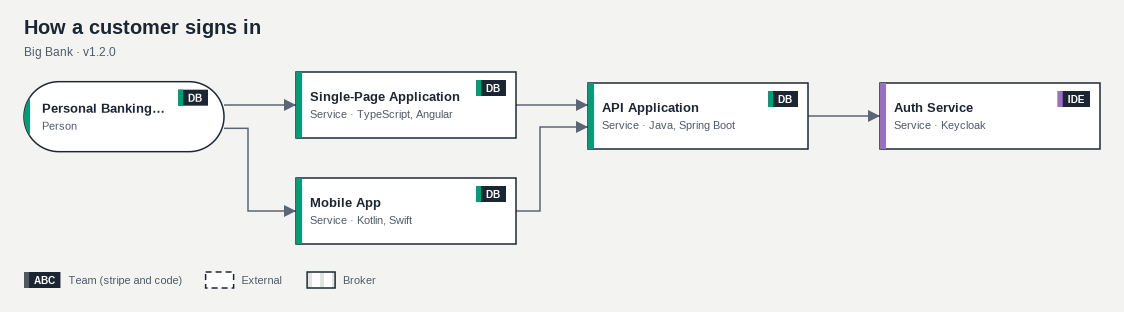
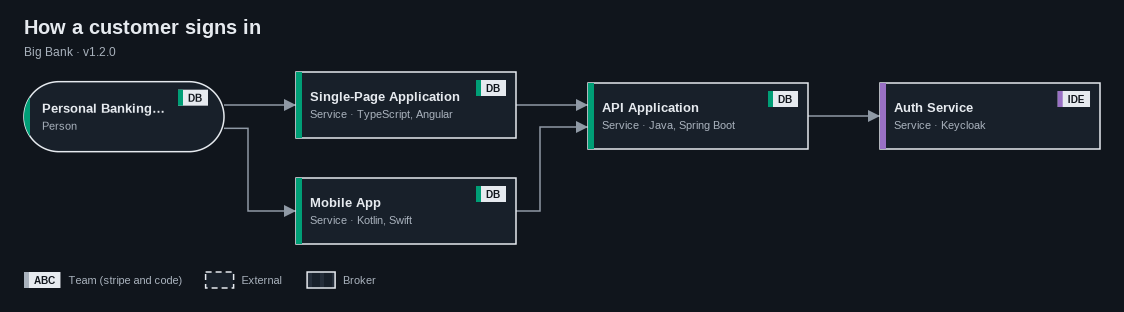
- Grow the Model: add a Project for another Team, connect Services across Projects, and save a View that answers a question.
- Let an agent do it: connect an agent over MCP.
- Review changes: add PR previews so every pull request shows what it changes.