

Elements
An Element is a node of the Model. There are four kinds, after the C4 model:
| Kind | What it is | Nests in |
|---|---|---|
| Person | A human or role that uses a System, such as a customer or a support agent. | Nothing: always top-level. |
| System | A named group of Services that together deliver a business capability. | Nothing: Systems don’t nest. |
| Service | A deployable, addressable unit of software: the thing with a URL and Deployments. | A System, or nothing. |
| Component | A part inside a Service that isn’t deployed on its own. | A Service. |
Nesting is strict: System › Service › Component. A Service may also stand outside any System.
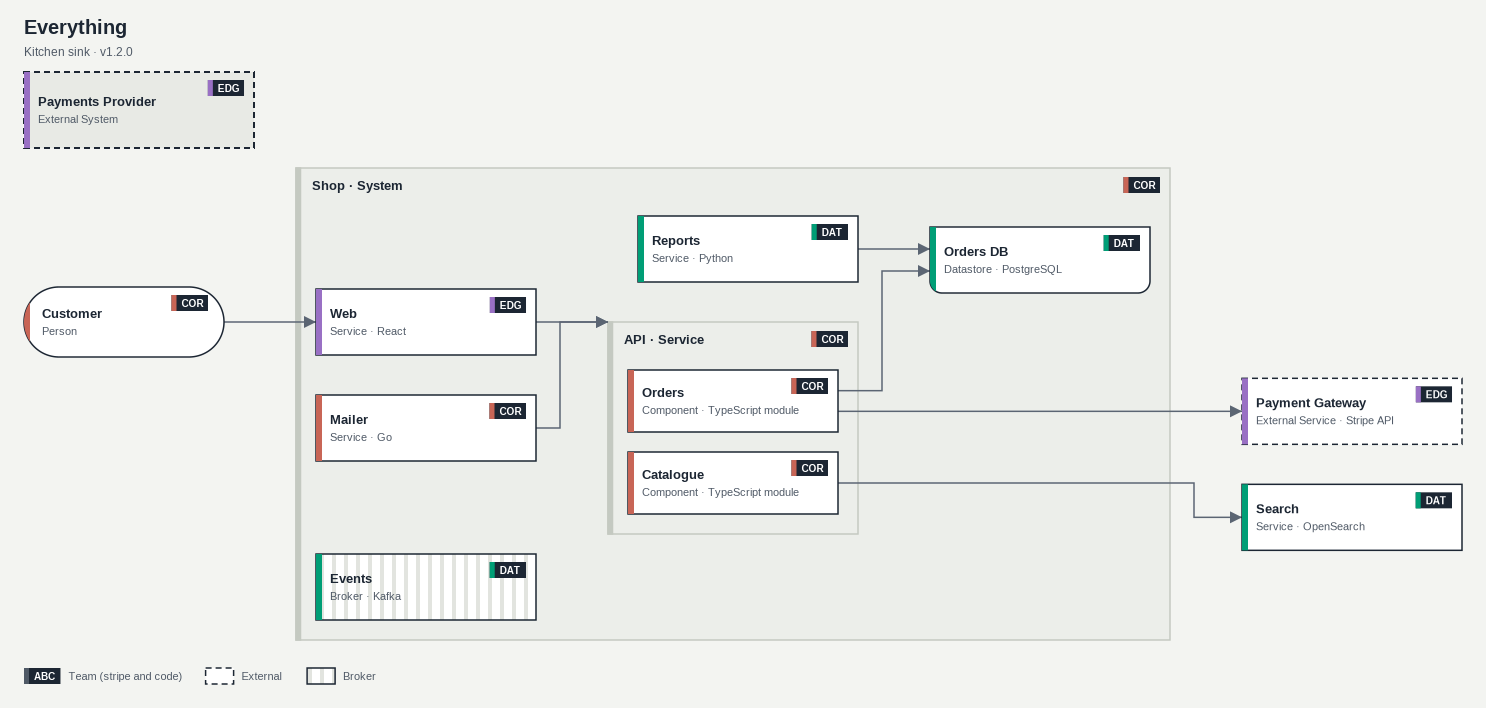
Declaring Elements
Section titled “Declaring Elements”Elements are declared under the top-level keys people, systems, services and components of any Project file, keyed by id, with children under their parent. This is the Kitchen sink’s Shop System, which has one of each kind of Service:
systems: shop: name: Shop description: An internal System with every Service type. services: web: name: Web description: An app Service. technology: React owner: edge tags: [customer-facing] links: - label: Runbook url: https://wiki.sink.example/runbooks/web relationships: - to: api description: Calls technology: JSON/HTTPS api: name: API description: An app Service with Components. technology: Node.js components: orders: name: Orders technology: TypeScript module relationships: - to: orders-db description: Stores orders in technology: SQL - to: payment-gateway description: Charges cards through technology: HTTPS catalogue: name: Catalogue technology: TypeScript module relationships: - to: search description: Searches with technology: HTTPS orders-db: name: Orders DB description: A datastore Service. type: datastore technology: PostgreSQL owner: data events: name: Events description: A broker Service. type: broker technology: Kafka owner: data mailer: name: Mailer description: Subscribes to order events. technology: Go relationships: - to: api description: Emails a receipt for each order interaction: async via: events channel: orders.placed payments-provider: name: Payments Provider description: An External System. external: true owner: edgeEvery Element has a name and can have a description, an owner, tags and links. On top of that:
- A Service has a
type:appby default,datastorefor a database or store, orbrokerfor a message broker that async Relationships run through. Each is drawn differently. - Services and Components have a
technology, shown under their name. - A System or Service can be External.
Every field is in the Elements and Relationships reference.
External Elements
Section titled “External Elements”An External System or Service runs outside the organisation, such as a payment provider or a card scheme. Its Owner is the Team accountable for the integration. An External Service has no declared Components (external-with-components): you can’t see inside it.
Elements in more than one file
Section titled “Elements in more than one file”A child usually sits under its parent. When a Project splits its Model across files, a top-level Service can name its System with in, and a Component its Service:
# A Service declared in a file of its own and placed in a System with `in`.services: reports: name: Reports description: A Service in Shop, declared outside the System's file. technology: Python in: shop owner: data relationships: - to: orders-db description: Reads order history from technology: SQLLevels
Section titled “Levels”The viewer and Views show the Model at a level:
- C1, the System landscape: People and Systems.
- C2, the Service landscape: Services, grouped in their Systems.
- C3: the Components inside a Service.
Each level is drawn from the same Elements. A diagram never adds an Element of its own.