

Dynamic Views
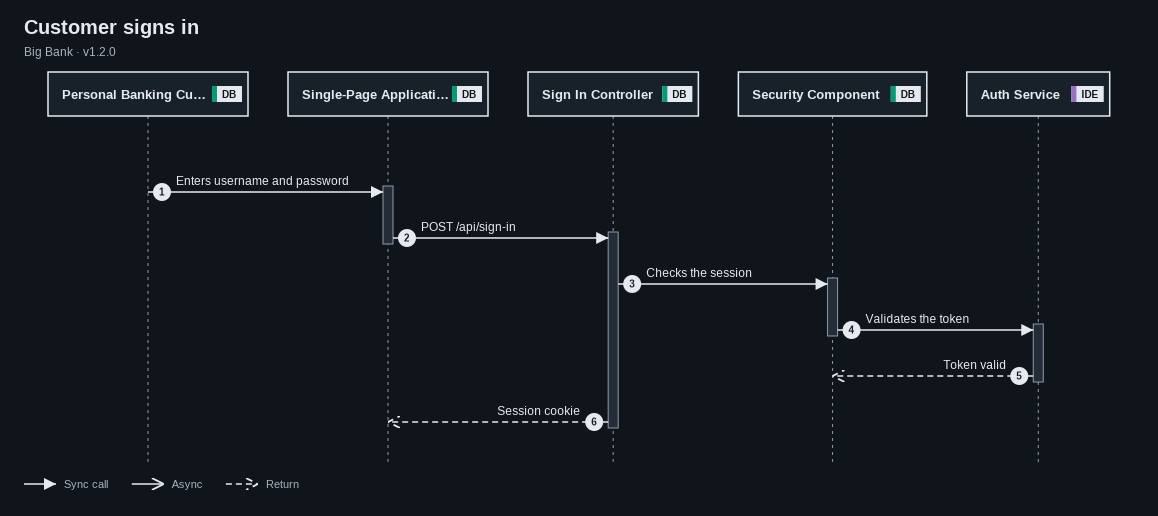
A Dynamic View shows one scenario, such as “a customer signs in”, as numbered Steps drawn as a sequence chart. Every Step follows a Relationship in the Model, so the scenario can’t show a call the architecture doesn’t have.
1. Trace the scenario
Section titled “1. Trace the scenario”Start from who or what begins it, and follow the Relationships: in the viewer, the Element panel lists each Element’s Relationships, and the Connect to… Lens shows the paths between two. Where the Model has no Relationship for a Step that happens, add the Relationship first.
2. Write the Steps
Section titled “2. Write the Steps”Add the View under views › dynamic in a Project’s views.yaml:
sign-in: title: Customer signs in steps: - from: customer to: spa description: Enters username and password - from: spa to: sign-in-controller description: POST /api/sign-in - from: sign-in-controller to: security-component description: Checks the session - from: security-component to: identity:auth-service description: Validates the token - from: identity:auth-service to: security-component return: true description: Token valid - from: sign-in-controller to: spa return: true description: Session cookie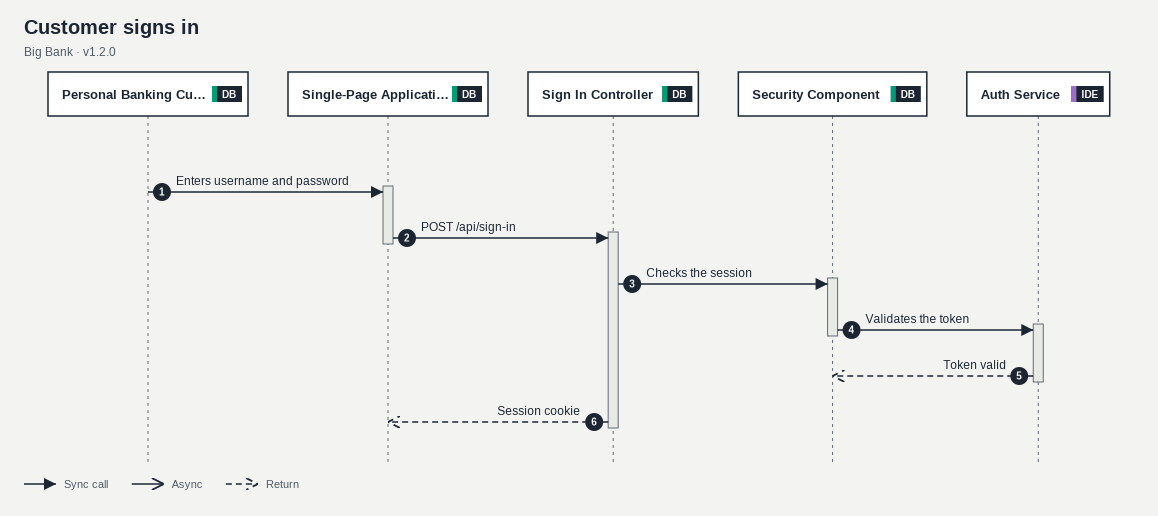
Each Step is one of:
- A call:
fromthe consumertothe provider of a Relationship, or of an edge derived from one, asspatosign-in-controller. - A reply:
return: true,fromthe provider backtothe consumer of a sync Relationship. - An event:
fromthe Publishertoa Subscriber, over the Subscriber’sviasubscription. It is drawn the way the event travels, though the Relationship points the other way.
When two Relationships connect the same pair, name one with relationship: <id>. participants fixes the order of the lifelines; otherwise they appear in the order they are first used.
3. Check it
Section titled “3. Check it”archidocs checkA Step needs a Relationship to follow. A reply written as a call has none:
views: dynamic: place-order: title: Place an order steps: - from: web to: api description: POST /orders - from: api to: web description: Order placedarchidocs check reports missing-step, because nothing declares that api depends on web. The second Step is the reply to the first, so it needs return: true.
In the viewer, the View opens as the sequence chart, with its Steps listed beside it: select a Step to follow it, or switch to the graph of numbered Steps.
With an agent
Section titled “With an agent”upsert_view writes a Dynamic View when its definition has steps, and find_paths helps trace one.
Related
Section titled “Related”- Views reference
- Kitchen sink, whose Dynamic View has a call, a derived edge, an event and a reply